
Manufacturing professional timekeeping equipment for over 24 years
Languages


Shopping Cart [more]
Categories
Information
Latest software versions
TS-Trening 2.xx 2.60
2.60 19.10.2026
- This is the last release of the older version. - All .exe modules have been updated.2.53 7.10.2026
- Automatically generates a list of changes.2.52 27.08 2026
- Assigning starting numbers to an entire group of competitors with a single click.2.51 - 02.06.2026
+ Training: Added the ability to create a list of results - warning: `tworz_startowa_z_wyniku2`2.50
- Improved `create_startowa()` function: Now, athletes are displayed even if they are not associated with a bib number.TS-Trening 3.xx 3.14b
3.14b 23.11.2026
- When the server controller is closed, it now also stops the OnLine processes and background agents to prevent them from continuing to run after the work is finished. - XML analysis: Competitor matching now uses the list of current events and the assigned bib numbers, making it easier to manage multiple events within a single database. - The start list has been standardized in reports and analysis. Subsequent runs are only recorded for competitors on the list, and the first run updates the existing entry. - Improved report template handling and added the ability to complete missing definitions during updates of older databases, preserving custom settings. - Added clear messages indicating the preparation of lists, results, and templates for online transmission, and provided a convenient way to preview them from the Communication section. - Improved the layout of messages, removed duplicate notifications, and expanded translations. - Enhanced diagnostics: Clearer reasons for database and file errors, with more precise identification of the problem location, and protection of sensitive data. TODO - This is still in BETA. We encourage you to test it and provide feedback. - Direct export from Stok to the database - without XML. Moving the classification function to the database. Instead of transferring entire results, the database will provide the result for a specific competitor, which is then compiled online with measurements and the list of competitors.3.13b 18.11.2026
- IMPORTANT: Changes affect the calculation and presentation of official competition results. - Added a configurable accuracy setting for competitions: seconds, tenths, hundredths, thousandths, and ten-thousandths of a second; labels in 10 languages. - Lap times are truncated to the competition's specified accuracy, without rounding; the total time is calculated from the truncated lap times. - Standardized the accuracy used for rankings, ties, gaps to the leader, and times in both the old and new reports, CSV/XLSX exports, and the full online results. - The report's working table stores values as DECIMAL instead of FLOAT; raw measurements remain unchanged. - New report: Separate frames for gate points, the blue total is displayed only on the right if it is non-zero; hides all trailing zeros in gate scores in both reports.3.12b 17.11.2026
- Synchronization of withdrawn competitors with the online report. - Automatic refresh of the online status for ongoing events and status indicators without page reload. - Isolation of the report export table and proper assignment of gate points to the correct lap (1/2).3.11b
- Cosmetic improvements to the first page.3.10b 16.11.2026
- Main page: Added translations for 24 items in 8 languages; verified the completeness of the main instructions, tools, resources, and menu texts. - XML analysis and results report: Added translations for 121 items in 8 languages, including messages, athlete selection, and result types. - New and edited event form: Added translations for 85 items in 8 languages, including online publishing, classification, and grouping. - Report template editor: Added translations for 43 items in 8 new languages, including standard descriptions of column functions. - Added a list of 10 languages with flags next to the theme switcher; new catalogs include basic labels, while the rest use the Polish dictionary. - TS-Training: Completed Polish and English translations of the interface – 1254 items with context separation (1396 references). - Marathon and Slope modules generate complete live results during measurements. - All modules (Slope, Marathon, Ninja, Tuning, Hippica) – implemented support for LT displays in a separate thread with buffering. - Tuning module – complete English translations.TS-Stok 2.76
2.76 17.11.2026
- Online Indicator TODO - wynikisąOnline - Full, customizable reports.2.75 16.11.2026
- Implemented support for sending LT display data in a separate thread.2.74 16.11.2026
- Queuing of data points from gates to the online system. - Sending complete results in real-time (not just individual measurements).2.73 10.11.2026
- Sending online results now includes data from gate crossings. - Automatically generating "xmm" files for live online results.2.72 09.11.2026
- Verified the order in which sessions are loaded when starting online competitions. - Sounds now play without interruption and are loaded into memory. - Changed the template for the XML file naming of results.TS-Maraton 1.79.1
1.79.1 17.11.2026
- Online status To Do: - Separate threads for the LT display and reader data.1.79 16.11.2026
- LT data is now sent in a separate thread. Automatic session saving and automatic full results export have been implemented.1.78 13.11.2026
- LT displays now run in a separate thread.1.77 13.11.2026
- Online data transmission. - Corrections for manually entered numbers. - Online testing: live measurements and results.1.76 30.10.2026
- New version - description of changes to be added.TS-Ninja 1.3.32
1.3.32 16.11.2026
- Support for two LT displays: buffering and a separate COM/ACK thread for each display, similar to Stoku 2.75.1.3.31 6.10.2026
- Compiler: x86_64 - LT display: Buffered version integrated with the common library (previously local). - REMOVAL: Support for LC series displays has been discontinued. - Support for two LT displays. - Automatic generation of a change log file. - Script for compressing and sending updates.1.1 - 1.3: Added support for LT displays (static text).
* To do: Add scrolling text. * Use coordinates from the LC (finish line) for displaying text. * Add the ability to cancel a competitor's start after holding the starter pistol for 3 seconds. * Enable automatic start without requiring TOR1 and TOR2 lists.TS-Tuning 3.56
3.56 19.11.2026
- The measurement time has been changed from double and float to `std::int64_t` in microseconds, using the common TS-common time model and functions. - Adjustments have been made to the start, finish line, RT/FS, 60 ft measurements, 1/8 and 1/4 mile times, synchronization, rankings, and sorting of results for both lanes. - Time formatting, LT displays, TimeSlips, printouts, and logs now use integer calculations; the precision settings for LT displays have been preserved. - The XML export still transmits seconds with four decimal places; speeds, points, and unit lock values remain unchanged. - Tuning sessions are now saved as v2; reading supports v1 format, converting older seconds accordingly, also for pair lists. - Time pulse decoding and VCC voltage readings have been separated; the manual correction resolution of 1 ms has been maintained. - 182 changes have been made across 5 files. Compilation and testing of functionality and session compatibility remain to be completed.3.55 16.11.2026
- Full English translation.3.54 16.11.2026
- - Added support for LT displays in a separate thread.3.53 22.10.2026
* LT buffering - testing. * LT display settings - improvements and minor adjustments. * Automatic saving of LT display parameters.3.52 22.10.2026
- Fixed DPI issue in the form. - Moved the buffered LT display.TS-hippika 1.49
1.49 16.11.2026
- Added support for LT displays in a separate thread.1.48 7.10.2026
- Automatically generates a list of changes. - Automatically includes the version number in the executable file.1.47
Here's the English translation of the provided changelog entries: * **Bug Fix:** Missing argument 3 for `create_zawody_raport` in `.../export.php` when copying a list from other events. * **Feature:** Training - "Create start list" - Issue with missing athletes, fixed in version 2.50. * **Feature:** Training - "Create list of results" - Warning message. * **Feature:** "Hippika" - Results/Time - Displaying qualifying times. * **Bug:** "Race already finished" - Multiple "meta1" windows appearing. * **Feature:** "Hitting the time standard" - Results displayed from A to Z. * **Feature:** "Two-phase" - Results displayed from A to Z, and the LT display is also active.1.45
- Support for PICCO 2.1.44
- Compiled for win64. - Minor bug fixes.TimeMaster sync 1.86
1.86 5.10.2026
* Added change tracking. * Added an upload functionality. * Migrated to a 64-bit Windows architecture (win64x).1.82 * Added the option to configure the "Minimum Repeat Time" in the chronograph.
1.75 - Fixed an issue with the decimal separator during text conversion.
1.5 _daylight disabled
RS232 COM ports in windows systems
COM Ports in Windows Systems
Often in Windows systems, when we have multiple COM ports—whether hardware or virtual—it's hard to figure out which of our devices corresponds to which port. text
Programs that communicate with hardware via COM usually don't automatically detect which COM port the device is connected to, so the user must specify the port number association (e.g., COM3, COM6, etc.) with the device on first launch.
To check the COM port numbers available in the system, launch Device Manager by right-clicking the My Computer icon, then selecting Manage and Device Manager.
You can also directly run the command devmgmt.msc

In Device Manager, we see a tree structure of devices in the computer. 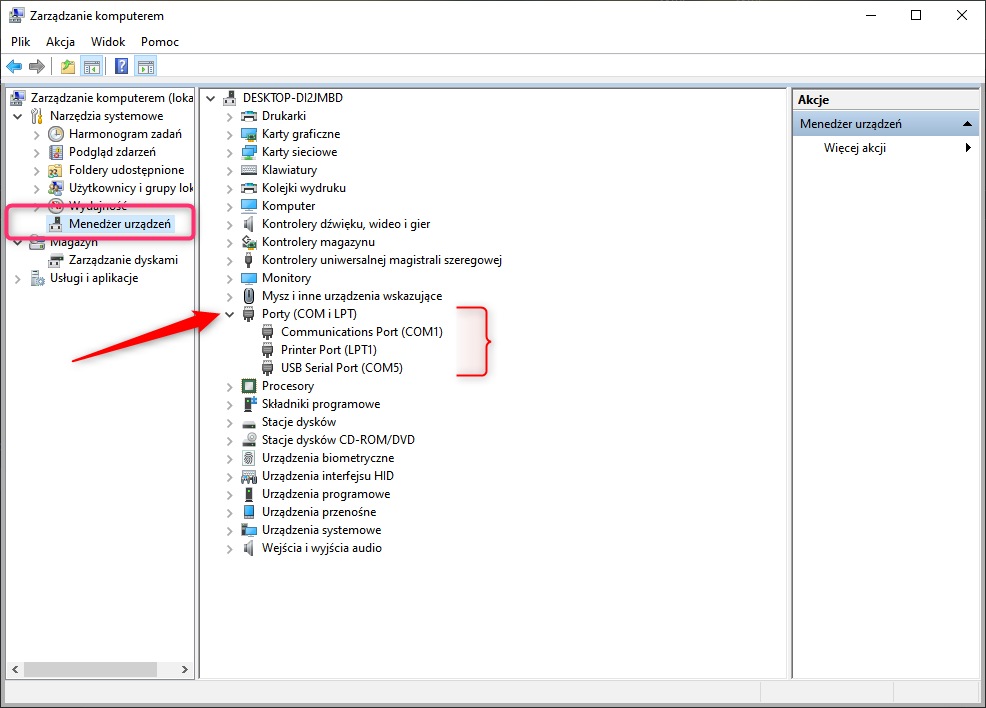
Find the PORTS (COM and LPT) branch. When expanded, we see the available COM ports, e.g.:

At this point, we'll see all COM ports active in the system. There might be quite a few entries here, especially if the computer has Bluetooth support. To find the COM port for your USB/RS232 device, the easiest way is:
- Note the current port numbers
- Plug in your device
- A new entry will appear on the list shortly—remember the COM number for that device.
If a new entry doesn't appear on the list after plugging in the COM/USB converter, you likely don't have the drivers installed. That's a topic for another blog post; for now, just a link to the drivers used by Sectro converters: FTDI VCP Drivers - Virtual COM Port .